> For the complete documentation index, see [llms.txt](https://as.talkcrm24.com/llms.txt). Markdown versions of documentation pages are available by appending `.md` to page URLs; this page is available as [Markdown](https://as.talkcrm24.com/talkcrm_ai-1/5.-front/5.4.md). Agents can also search and read this documentation through its [MCP server](https://as.talkcrm24.com/~gitbook/mcp).

# 5.4 접수 사용방법(내원 접수 처리)

접수 및 상담중 고객 리스트가 시간 순서대로 표시된다.

<figure><img src="https://3899761469-files.gitbook.io/~/files/v0/b/gitbook-x-prod.appspot.com/o/spaces%2FgOYfCA5TFpsvYrih5JMc%2Fuploads%2Ff6SbuWfMKeITpOr4eDLQ%2Fimage.png?alt=media&amp;token=29c7b7f8-6b77-43ac-ba32-e76f292be73a" alt=""><figcaption></figcaption></figure>

## 리스트 필터

<figure><img src="https://content.gitbook.com/content/gOYfCA5TFpsvYrih5JMc/blobs/Vo7KMRkhxqEUJbbANyMl/image.png" alt=""><figcaption></figcaption></figure>

&#x20;  \- 전체: 모든 리스트 출력

&#x20;  \- 예약: 예약자 리스트 출력

&#x20;  \- 비예약: 비예약자 리스트 출력

## **일자 선택**

<figure><img src="https://content.gitbook.com/content/gOYfCA5TFpsvYrih5JMc/blobs/FsfhNJMBQlSSBtIFmruV/image.png" alt=""><figcaption></figcaption></figure>

### 날짜선택

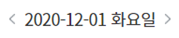
\- 선택된 날짜가 표시된다. 디폴트 일자는 오늘이다.

\- 좌 우 < > 버튼을 클릭하면 이전일자, 이후일자로 1일단위로 이동된다.

<figure><img src="https://content.gitbook.com/content/gOYfCA5TFpsvYrih5JMc/blobs/qMGYt9rT2FkOmizFI4sM/image.png" alt=""><figcaption></figcaption></figure>

### 날짜이동

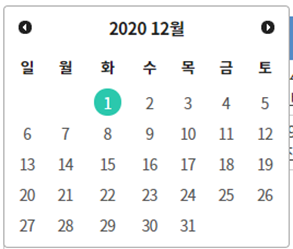
\- 클릭하면 하기와 같이 달력메뉴가 활성화된다.

\- 해당 일자를 선택하면 날짜이동이 된다.

<figure><img src="https://content.gitbook.com/content/gOYfCA5TFpsvYrih5JMc/blobs/UNqZ41DXowLI6mwe8Ftq/image.png" alt=""><figcaption></figcaption></figure>

### 새로고침

\- 클릭하면 선택된 일자로 모든 데이터를 다시 불러들인다. (Reflash)

## **상단 퀵 메뉴**

<figure><img src="https://content.gitbook.com/content/gOYfCA5TFpsvYrih5JMc/blobs/DCq5ubw0r2VV4vQWb8sZ/image.png" alt=""><figcaption></figcaption></figure>

### 상담정보 등록

&#x20;![](https://content.gitbook.com/content/gOYfCA5TFpsvYrih5JMc/blobs/oxvXjgnSpT1MgVgl4yme/image.png) \
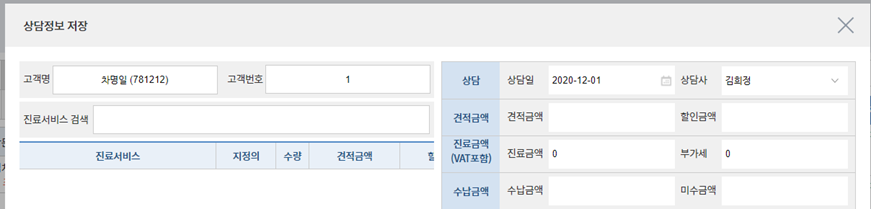
하단 리스트를 선택하고 “상담등록”을 클릭하면 좌측 선택된 상담사로 상담정보 등록창이 활성화된다. 상담을 등록하고 저장하면 상담정보가 등록된다.

<figure><img src="https://content.gitbook.com/content/gOYfCA5TFpsvYrih5JMc/blobs/2cSZo2ZEfxYvYYAiXQ0D/image.png" alt=""><figcaption></figcaption></figure>

### 내원취소

&#x20;![](https://content.gitbook.com/content/gOYfCA5TFpsvYrih5JMc/blobs/ytZE6mR48oRvYKHYCUnw/image.png) 하단 리스트를 선택하고 “내원취소”를 클릭하면 내원접수가 취소되고 예약 섹션으로 이동된다.

&#x20;

## 우측마우스 기능

선택한 리스트위에 우측마우스 클릭하면 하기와 같이 메뉴가 팝업된다.

{% @arcade/embed flowId="e5ss9BQ79sOxPFW0JyUw" url="<https://app.arcade.software/share/e5ss9BQ79sOxPFW0JyUw>" fullWidth="true" %}

### 내원취소

\- 선택한 리스트가 내원접수가 취소되고 예약 섹션으로 이동된다.

•   진료대기, 진료중, 진료완료

\- 선택한 리스트가 “진료”섹션으로 이동된다. 내원 상태값은 선택한 항목으로 변경된다.

### 귀가

\- 선택한 리스트가 프런트에서 제거된다. 예약상태값은 “귀가”로 변경된다.

\- 예약관리창 귀가자 리스트 검색에서 확인 가능